Scattered data
Ninja, Olympus, Metabase, WhatsApp and personal sheets. One PM downloaded five sheets to average a batch's ratings.
 All work
I led the design of a 360° learner view for Jedi, the revamp of Ninja, an internal learner operations platform that helps program managers (PMs) track learner progress, monitor engagement, and support every learner across their batches.

The target was 40% more learners per PM. Jedi delivered 80%, and 9 in 10 PMs adopted it.
Double the 40% target, confirmed over 3 months of tracking.
The green stretch past the target line is the extra 52 learners per PM.
Program Managers keep a cohort on track: they chase payments, answer queries and catch learners before they drop out. Each looked after about 100–120 learners across 1–2 batches, and the tools made most of that work slow.
The goal: make each PM 40% more efficient, so they can support more learners without new hires.
Ninja, Olympus, Metabase, WhatsApp and personal sheets. One PM downloaded five sheets to average a batch's ratings.
The weekly engagement report was collated learner by learner.
Learners needing regular calls, made on personal phones that no report captured.
Dropout data vanished; transfers showed as one icon with no history.
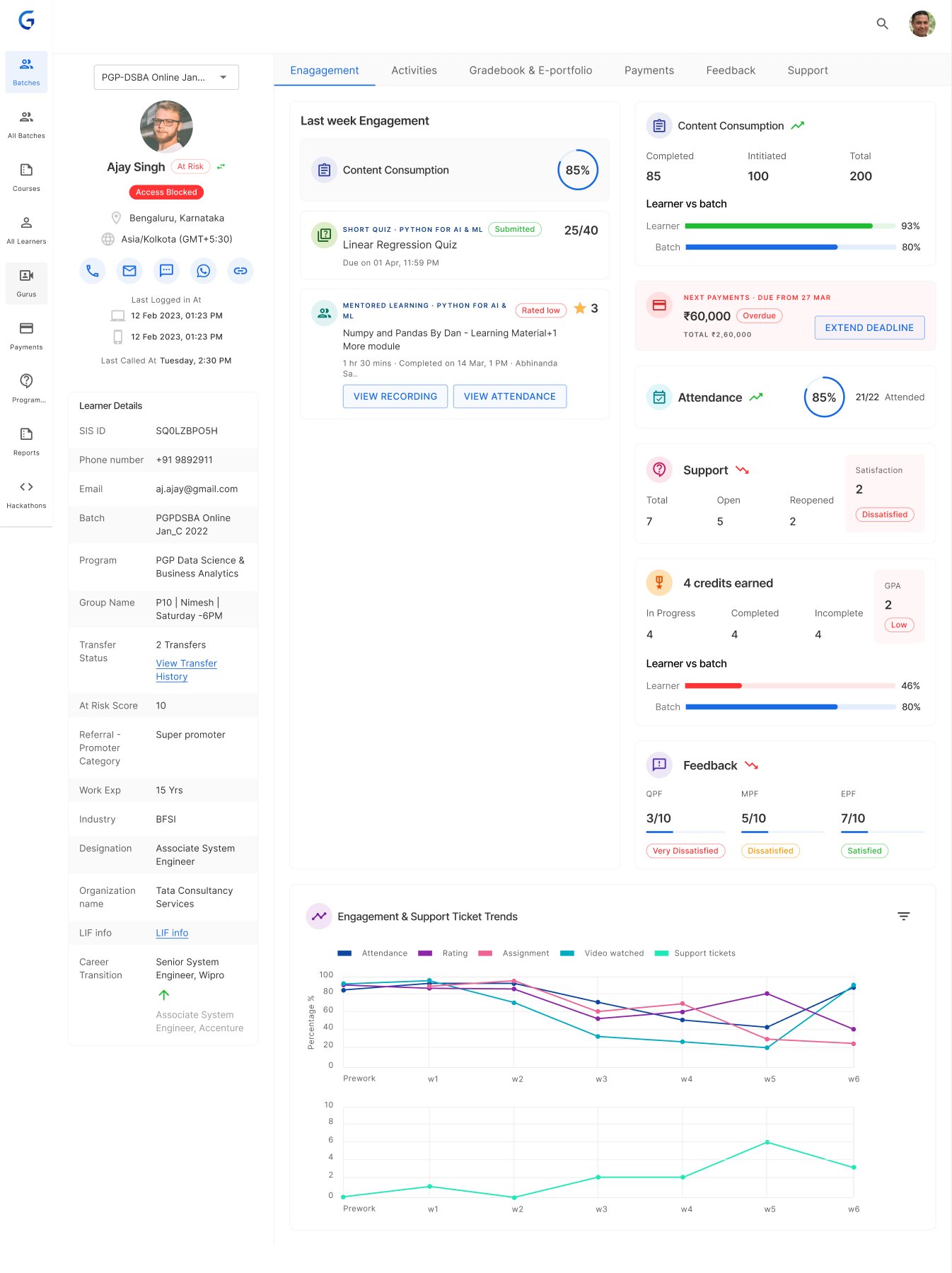
Learner Details gives Program Managers a single place to understand a learner’s progress and take action. I designed the experience across web and mobile, and co-led the research that informed the wider platform.
IA, wireframes and high-fidelity design for 8 modules: Profile, Engagement, Activities, Payments, Gradebook, Feedback, Attendance and Support.
With two research partners, interviewed 16 PMs across domestic, international and B2B programs.
Research findings set the Jedi IA and shaped the Learner Engagement Sheet and Batch Details designs.
Research surfaced dozens of requests. I tested each against one question: which of a PM's hours can the product give back? That turned a wishlist into four ways to design for efficiency.
A day-by-day task map turned scattered complaints into one shared picture of where time was lost.
Payments reduced access-blocked cases, while Activities enabled structured follow-ups. This helped Engineering and Operations prioritise work based on impact.
Support, at-risk and reporting were the bigger time sinks.
PMs asked for subtle change and valued the existing structure.
With up to 220 learners each, PMs needed to spot who needs help at a glance.
Calls on personal phones and WhatsApp were never recorded. The app records them automatically.
PMs from first-year ICs to AGMs, across online, classroom, international and B2B programs, took us through a typical week, their top frustrations and how they spot a learner who is slipping.
11 of 18 weekly PM tasks are now handled in Learner Details
Seeing all the learner engagement details in one place would be helpful.PM, cybersecurity program
It takes 3–4 hours to collate all the data in the learner engagement report.Senior PM, cybersecurity program
If a student has transferred 5 times, we can't see the number, just an icon.PM and manager, data science
The research shaped a new IA that puts the learner at the centre. Follow the numbered steps to see how a PM moves from the dashboard to a single learner, or pick any screen in the sitemap.
Before the high-fidelity screens, I defined a shared tag scale. Red means act now, amber means watch, green means fine, so a PM reads risk the same way on any tab.
Each tab answers a question PMs told us they asked every week. Watch the walkthrough, or pick a tab to jump to it.
Only calls made through third-party apps were tracked, so most PM–learner contact never reached a report. The app logs phone and WhatsApp calls automatically.
PMs stop marking calls by hand · Managers see contact volume per learner · Ops can plan resourcing


The feature moved the company's bottom line: ₹5 Cr added to an EBITDA of ₹39 Cr, close to 12%. With dashboards and automation taking away half the manual work, attrition fell by 20%.
Activities and transfer history is so helpful and makes my life easier.Program Manager
The 360 degree view of the learner makes it easy for handling support. Everything in one place.Program Manager
PMs needed existing capabilities consolidated in one view, prioritised by urgency. The biggest gains came from reducing navigation, not adding screens.
Mapping a PM’s workweek turned scattered pain points into clear inefficiencies, helping leadership prioritise based on evidence rather than opinions.
We validated an 80% improvement after launch. Next time, I’d baseline time-on-task per workflow to measure each module’s impact more clearly.
Jedi removed the manual tracking. The next step is to let AI take on the repetitive conversations and follow-ups, so PMs spend their time only where a human makes the difference.